How to create the perfect buy box for your Shopify store's PDP (2025 Guide)
Learn how to build a high-converting Shopify buy box with this step-by-step guide. Discover best practices, smart features, and design tips to boost sales.
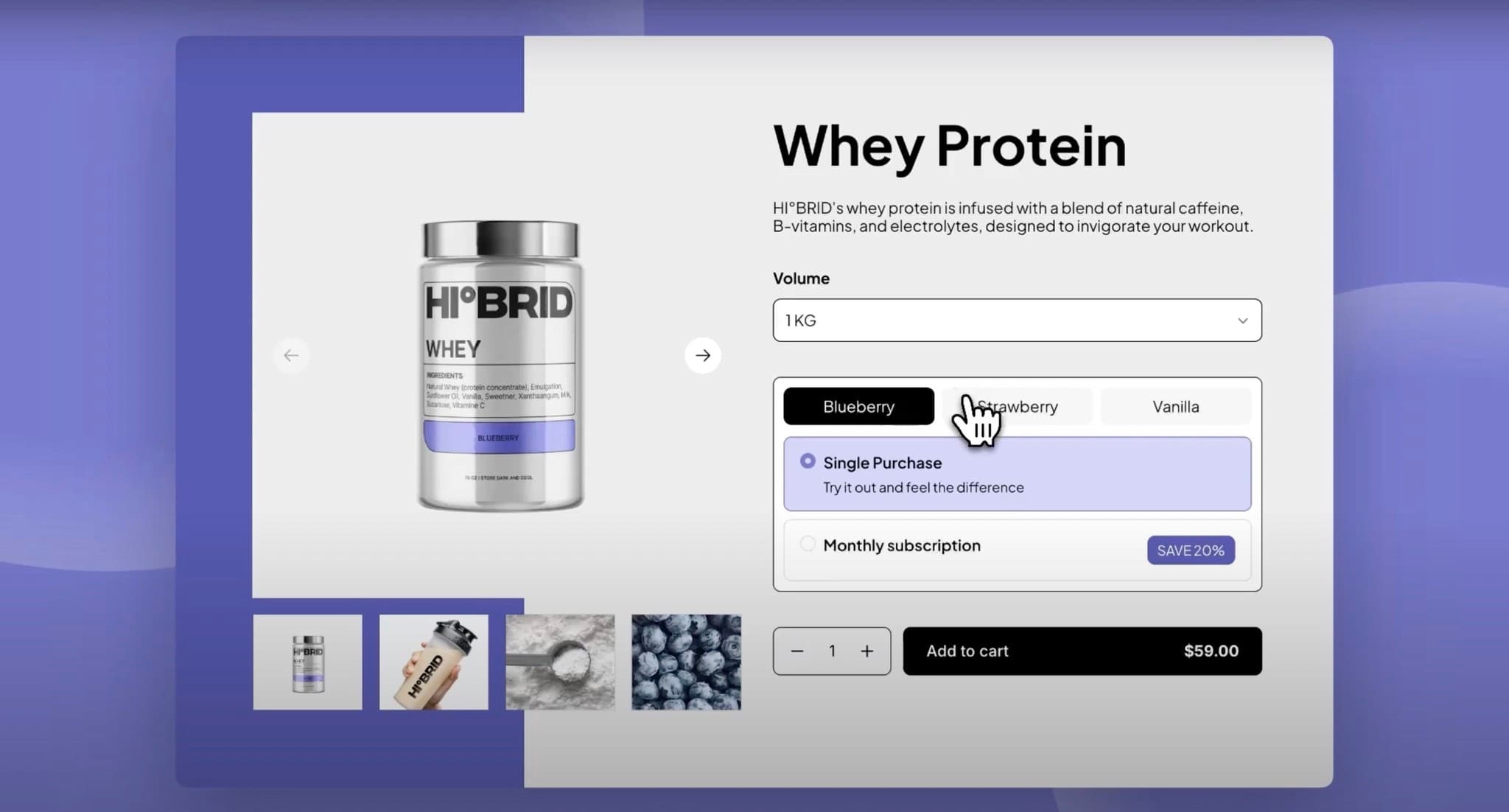
A well-designed buy box can be the difference between a visitor and a customer. In fact, optimizing your Shopify product page buy box can significantly increase conversions. This comprehensive guide will show you exactly how to create a high-converting buy box that drives sales and enhances user experience.
What is a buy box on Shopify?
A buy box is the section on your product page where customers make their purchasing decisions. It typically includes product variants, pricing, quantity selectors, and the add-to-cart button. Think of it as your digital sales counter – it needs to be intuitive, trustworthy, and conversion-focused.
How to build your Shopify Buy Box?
This tutorial from the Instant Academy explains how to build the perfect buy box:

Essential elements of a high-converting Shopify buy box
1. Product variant selectors
Size and Flavor Options: Your variant selectors should be immediately visible and easy to use. Consider these best practices:
- Use dropdown menus for options with many choices (like sizes)
- Implement button-style selectors for visual options (like colors or flavors)
- Ensure selected variants are clearly highlighted
- Test both horizontal and vertical layouts to see what works best for your products
Visual Feedback: When customers select different variants, provide immediate visual feedback. This could include:
- Color changes in the background or product images
- Border highlights around selected options
- Dynamic pricing updates
2. Subscription and purchase options
Modern e-commerce success often depends on recurring revenue. Your buy box should seamlessly integrate:
Single Purchase vs. Subscription
- Clearly distinguish between one-time and subscription purchases
- Show savings percentages for subscription options (e.g., "Save 20% with monthly delivery")
- Use conditional logic to show relevant information based on selection
Subscription Details: When customers select a subscription option, display:
- Delivery frequency
- Cancellation policy
- Subscription benefits
- Easy modification options
3. Dynamic pricing display
Your pricing should be impossible to miss and always accurate:
- Show original price and discounted price when applicable
- Update pricing in real-time as variants change
- Display subscription savings clearly
- Include any applicable taxes or shipping costs upfront
4. Smart quantity selector
Not all products need quantity selectors visible at all times:
- Show quantity selectors for single purchases
- Hide them for subscription products (typically quantity of 1)
- Use clear plus/minus buttons with the current quantity displayed
- Set reasonable minimum and maximum quantities
5. Compelling Call-to-Action button
Your add-to-cart button should be:
- Large enough to tap easily on mobile devices
- Use action-oriented text ("Add to Cart," "Buy Now," "Start Subscription")
- Match your brand colors while standing out on the page
- Include pricing information when helpful
Advanced buy box features that drive conversions
Dynamic background colors
Create visual interest by matching your buy box background to selected product variants. This technique:
- Reinforces the customer's selection
- Creates a more immersive shopping experience
- Helps products feel more premium and considered
Conditional element display
Use smart conditional logic to show or hide elements based on customer selections:
- Show quantity selectors only when needed
- Display subscription information only for subscription selections
- Hide unavailable options for out-of-stock variants
Trust signals and social proof
Integrate trust-building elements directly into your buy box:
- Customer reviews and ratings
- Security badges
- Return policy information
- Stock levels or urgency indicators
Mobile-first buy box design
With over 70% of e-commerce traffic coming from mobile devices, your buy box must be mobile-optimized:
Touch-friendly design
- Buttons should be at least 44px tall
- Adequate spacing between interactive elements
- Easy-to-tap variant selectors
Streamlined layout
- Stack elements vertically on mobile
- Prioritize the most important information
- Use collapsible sections for detailed information
Technical implementation best practices
Page speed optimization
A slow-loading buy box can kill conversions:
- Optimize images and use appropriate formats (WebP when possible)
- Minimize JavaScript for variant switching
- Use CSS for styling instead of images when possible
- Implement lazy loading for non-critical elements
Accessibility considerations
Make your buy box accessible to all users:
- Use proper heading structure (H1, H2, H3)
- Include alt text for images
- Ensure sufficient color contrast
Common buy box design mistakes to avoid
- Overwhelming Choices: Too many options can lead to decision paralysis
- Hidden Costs: Surprise shipping or tax costs at checkout hurt conversions
- Poor Mobile Experience: Tiny buttons and cramped layouts frustrate mobile users
- Slow Loading: Customers won't wait for a slow buy box to load
- Unclear Pricing: Confusing or hidden pricing reduces trust
Testing and optimization strategies
A/B testing ideas
Test these buy box elements to improve conversions:
- Button colors and text
- Layout arrangements
- Subscription vs. one-time purchase prominence
- Trust signal placement
- Variant selector styles
Key metrics to track
Monitor these metrics to measure buy box performance:
- Add-to-cart rate
- Conversion rate
- Average order value
- Subscription signup rate
- Mobile vs. desktop performance
Conclusion
Creating the perfect Shopify buy box requires careful attention to user experience, mobile optimization, and conversion psychology. By implementing the strategies outlined in this guide – from smart variant selectors to conditional logic and dynamic pricing – you'll create a buy box that not only looks professional but drives real results.
Remember, the best buy box is one that makes purchasing as frictionless as possible while building trust and excitement around your products. Start with the basics, test continuously, and iterate based on your customer behavior and feedback.