Shopify development is evolving fast.
Until recently, building custom sections or themes for your Shopify store meant hiring a developer, learning Liquid, or wrestling with limited theme settings. But now, AI is changing the game.
Meet the AI Shopify theme builder: a new way to build for Shopify using nothing but your words.
An AI Shopify theme builder can save you hours of design work while creating more conversion-focused online stores in 2025. These tools now automatically generate custom Shopify theme sections based on your prompts, eliminating the need for coding knowledge or extensive development time.
For store owners looking to stay competitive as 70% of retail executives plan to implement AI tools in 2024 (Vogue Business), investing in an AI theme builder isn't just about efficiency — it's about survival in an increasingly automated retail landscape.
In this post, we’ll break down:
What is an AI Shopify theme builder tool?
What is Instant, and how does it work?
How to integrate AI in your Shopify store design workflow
21 AI Shopify store design prompt ideas for Instant
What makes AI Shopify theme builders essential in 2026?
Where does the need for AI in Shopify theme building come from?
Final thoughts: The future of Shopify development
What is an AI Shopify theme builder tool?
An AI Shopify theme builder is a tool that lets you generate custom sections and components for your Shopify store using natural language prompts. Instead of writing Liquid code from scratch, you describe what you want, and the AI does the rest.
It’s fast, flexible, and built to adhere to Shopify's best practices.
One of the top tools in this space is Instant, a Shopify theme builder tool with powerful AI features:
What is Instant, and how does it work?
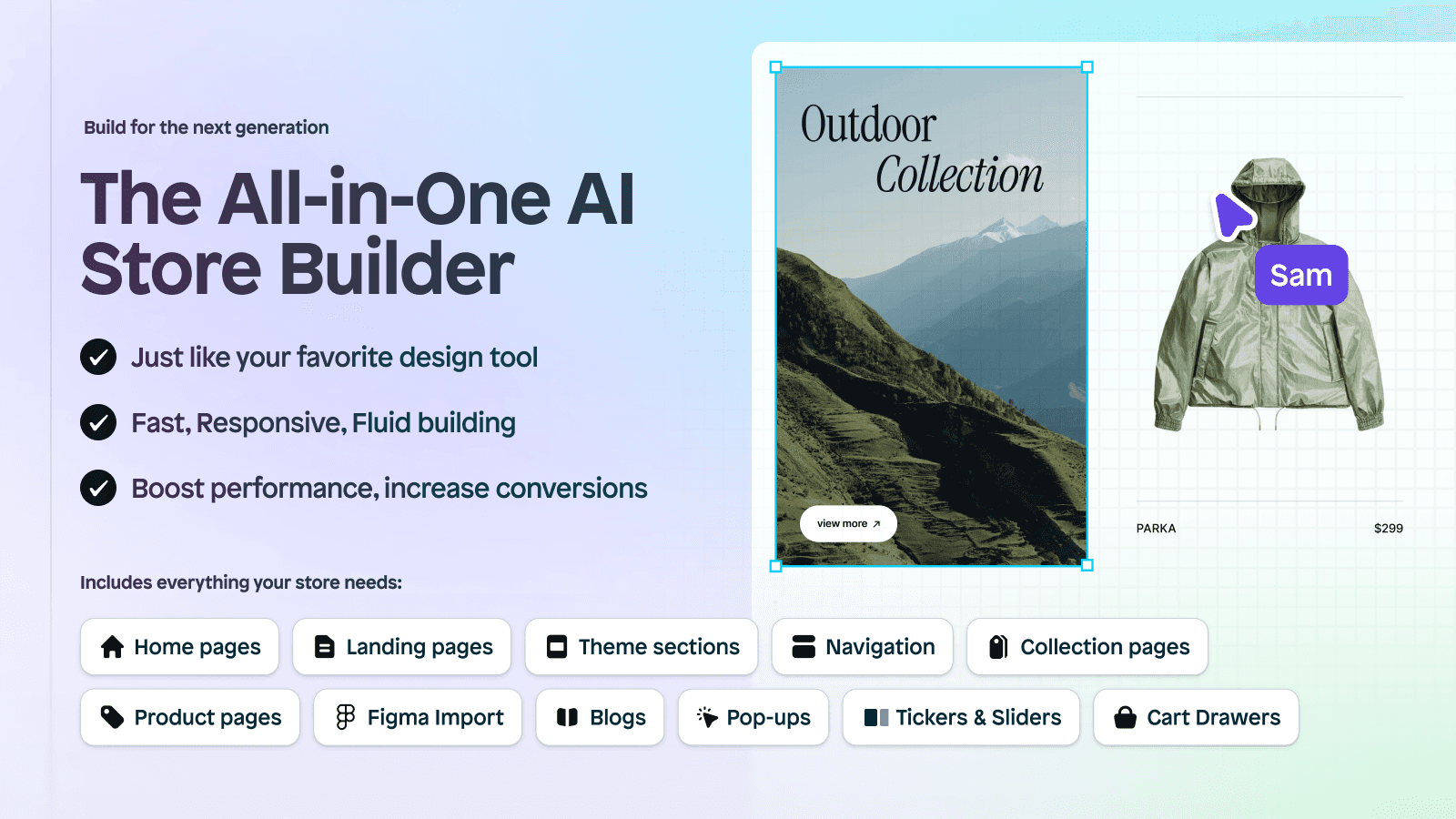
Instant is an all-in-one, AI Shopify store builder that can be used to build any page or section in your Shopify theme: homepage, PDP, collections page, landing page, sections, cart drawer, navigation menu, and more. Instant also includes native A/B testing features to help refine and optimize your designs for peak performance. There are four easy ways to build with Instant: AI prompting, template customization, Figma to Shopify, or completely from scratch. This makes it possible to bring your design to life in whatever way works best for your team.
What makes Instant different?
Compared to other page builders, Instant is a complete store builder. This means you can completely customize your Shopify theme and get features natively in Instant (like pop-ups, cart drawer, etc.) rather than investing in multiple smaller Shopify apps.
1. Describe what you want to build
You start by telling Instant what kind of section you want.
For example:
“Create a featured collection with product cards, star ratings, and a CTA button.”
2. Instant generates the Shopify design
After you've finished prompting, Instant AI will begin wireframing the page for you. From there, you can change the theme preset options.
3. Edit, tweak, and iterate your AI Shopify design
Edit your layout in the visual canvas. Make sure you check for responsiveness across all viewports for the best performance.
4. Publish your AI Shopify theme layout
If you've connected Instant to your Shopify store already, then, with a single click, you can publish your content to Shopify!
21 AI Shopify store design prompt ideas for Instant
Need help getting started? Here are some example prompts you can use with Instant to generate custom Shopify sections instantly:
Product-focused prompts:
“Create a product carousel that displays featured products with star ratings and a ‘Shop Now’ button.”
“Build a product comparison table for three bestsellers with feature checkmarks.”
“Design a product grid showing 4 items per row, each with quick add-to-cart buttons.”
Social proof & trust:
“Create a testimonial slider with customer reviews and star ratings.”
“Build a review section below the product that highlights verified buyer feedback.”
“Add a press feature bar with logos of media outlets.”
Collection & navigation:
“Generate a featured collections section with image tiles and hover animations.”
“Build a mega menu layout with dropdowns for categories and subcategories.”
“Design a sidebar filter for a collection page with size, color, and price filters.”
Branding & visuals:
“Create a full-width hero banner with a background image, headline, subtext, and CTA button.”
“Design a split-section layout: text on the left, image on the right, and a ‘Learn More’ button.”
“Build a brand story section with a large image, paragraph text, and signature.”
Conversion boosters:
“Add a limited-time countdown banner above the header.”
“Build a sticky CTA bar that shows on scroll.”
“Design a promotional section with 3 product bundles and savings tags.”
Mobile-first ideas:
“Create a mobile-friendly product grid with swipe gestures for carousel.”
“Build a collapsible FAQ section that looks clean on mobile.”
“Design a floating action button that links to the cart.”
Experimental layouts:
“Create an animated section with hover effects and a slide-in text panel.”
“Build a split-section with a video on the left and benefits list on the right.”
“Generate a parallax scrolling section featuring lifestyle imagery.”
What makes AI Shopify theme builders essential in 2026?
AI theme builders cut Shopify store design time from weeks to hours
Store owners can now compete with major brands without hiring designers
AI theme builders on Shopify streamline store design
In 2026, setting up an online store has changed completely. Before AI tools, store owners spent weeks choosing layouts, colors, and design elements. They needed to hire designers, agencies, or learn complex design skills themselves.
Now, AI Shopify theme builders transform this process.
An AI Shopify theme builder like Instant:
Speeds up development cycles
Makes custom design accessible to non-developers
Reduces reliance on costly dev resources
Helps you ship updates faster and more frequently
With the right prompting, these tools can generate complete store designs in minutes rather than weeks. The AI handles technical aspects like responsive design, loading speed optimization, and layout balance automatically. It’s not just a productivity tool. It’s a competitive advantage.
Where does the need for AI in Shopify theme building come from?
Traditional Shopify theme building demands extensive technical skills and time
The crowded e-commerce landscape requires distinctive store designs to compete
Manual design challenges
Creating a standout Shopify store traditionally required significant technical knowledge and design skills. Store owners faced a steep learning curve when trying to customize themes to match their brand vision. The process often involved understanding Liquid (Shopify's templating language), a skill that many entrepreneurs simply don't have time to master.
According to Aureate Labs, while theme selection and customization can take approximately 1–3 days for basic setups, more intricate customizations may require several weeks. This extensive time investment represented a major barrier to market entry, especially for small businesses with limited resources.
Beyond the time investment, technical limitations often force compromises between design vision and practical implementation. Many store owners settle for cookie-cutter templates that don't fully represent their brand personality, simply because custom development is too expensive or complex.
Final thoughts: The future of Shopify development
As we head deeper into 2026, the AI Shopify theme builder isn't just another tool; it's becoming essential for store owners who want to stay ahead.
With tools like Shopdev, Shopify store owners can finally move as fast as their ideas, with no technical barriers in the way.
If you're looking to streamline your workflow and build more custom designs for your Shopify store, now’s the time to explore an AI Shopify theme builder.
Try Instant for free today.