AI product photography: Guide for Shopify & eCommerce (2026)
See how AI product photography can transform your eCommerce business. Learn tools, techniques, and best practices to create product images that convert in 2026.
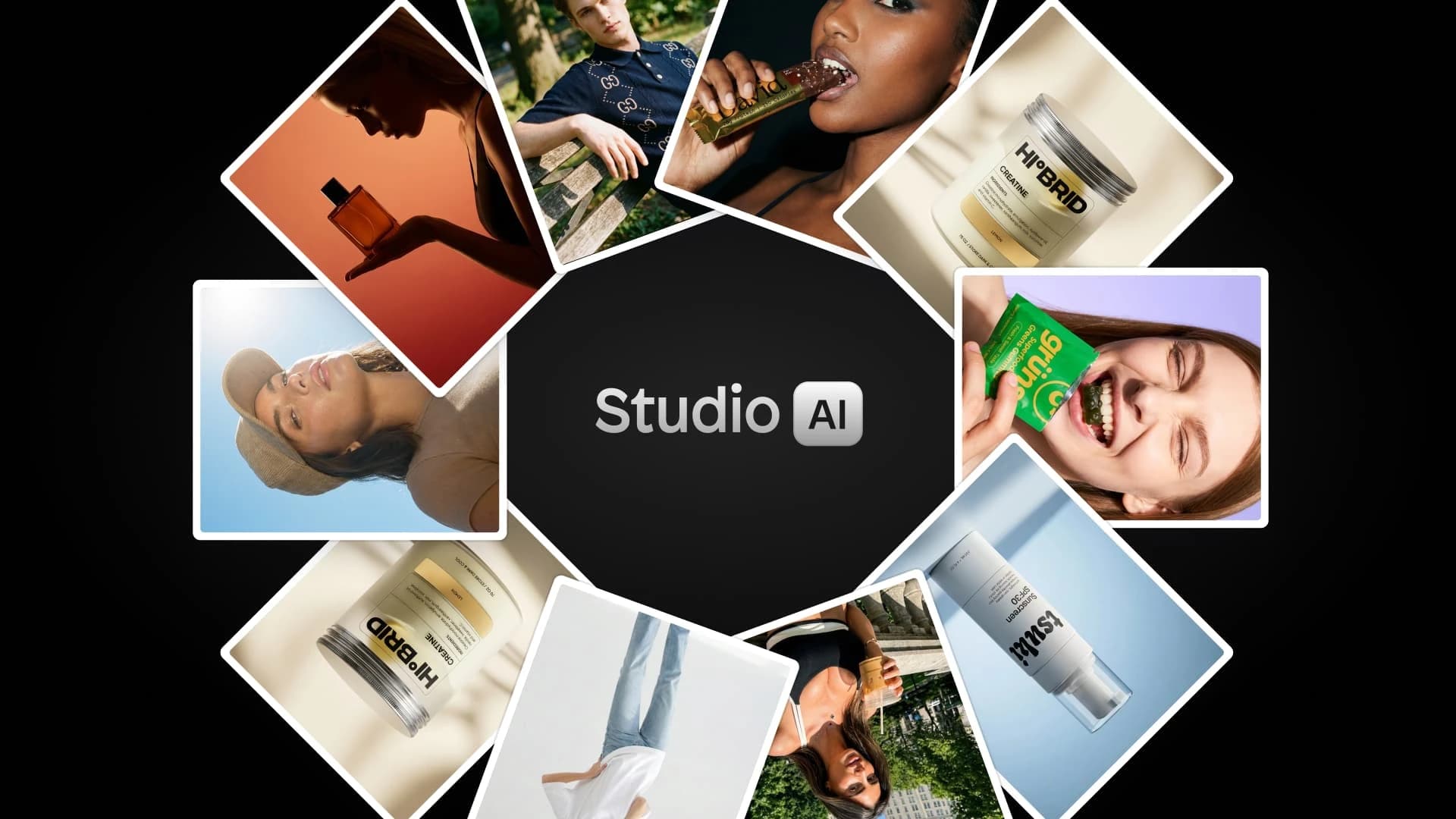
Product images are an essential part of your online store design, because without images, customers cannot experience and understand what it is that you’re selling. But traditional product photography is a time-consuming and costly process. A single image could cost from $ 0 to $500+ per product, and that’s not including studio fees, editing/styling, or usage rights. Data from Baymard shows that 55% of brands use decent (or better-quality) images on their sites, suggesting that many brands consider product photography a “necessary evil” to create a high-converting online shopping experience. But with the evolution of better AI product photography options, this may no longer be the case!
AI product photography is the use of generative AI to create, edit, or enhance product images for e-commerce store designs and marketing campaigns. According to Google Trends, searches for “AI for product photography” are up 50% globally compared to the previous year and up 40% over the last three months.
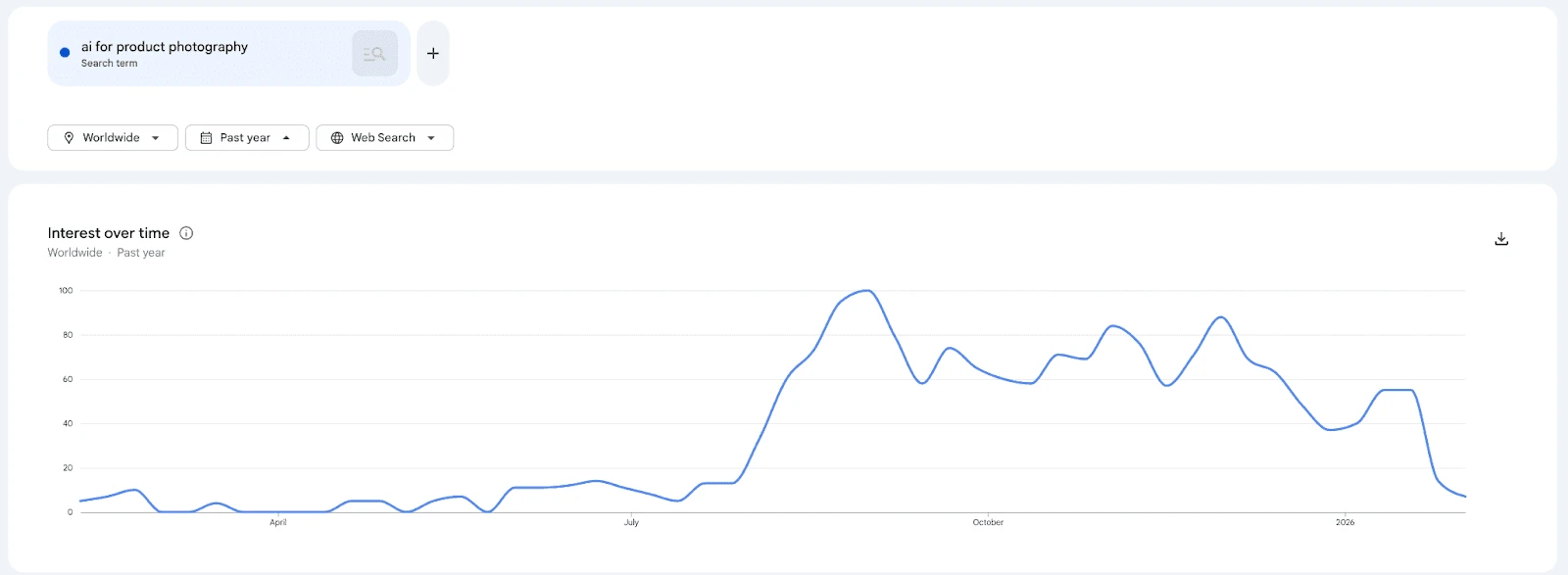
Data like this suggests that demand for AI product photography solutions and apps is growing as brands recognize the potential of these technologies. This guide is written for Shopify sellers, eCommerce brands, dropshippers, and small businesses looking to explore whether AI product photography could fit into their design workflow.
By the end of this guide, you’ll understand:
Let’s get started with the basics:
What is AI product photography?
Put simply, AI product photography is the use of AI to create product images for ecommerce. To understand the scope of what AI product photography can create, it is necessary to first understand product photography.
What is product photography?
Traditional photography might include a simple black-and-white background with a few angles, but high-quality product imagery usually includes additional content to help shoppers understand the product and feel inspired.
There are seven types of product images in eCommerce, identified by Baymard:
- Compatibility: Images that show features to help customers assess if a product will work for their intended goal.
- Lifestyle: Images that tell a story by displaying your product with your ideal customer or other products related to your ideal customer.
- Customer: User-created content (UGC) images that have been created by real customers who use your product.
- Textural: Zoomed-in, close-up images of your products that showcase the texture or material.
- Size and proportion: Images that show your product in a context that makes its actual size easy to see.
- Use-case: Images that show examples of how your product can be used in real life to inspire shoppers.
- Animate: Use images of humans or animals with your product, rather than just showing the product.
How does AI product photography fit in?
AI-generated product images can be used to create all of these different types of images; but is particularly useful for lifestyle, use-case, and animate images.
Main types of AI product photos:
There are a few main types of AI product photography, including:
- AI Background generation/replacement: including, but not limited to, removing backgrounds, generating lifestyle scenes, and creating contextual environments.
- AI photography model generation: including virtual models wearing products, different body types, and demographics, and on-model apparel visualization.
- Lifestyle scene creation: such as products in real-world contexts, seasonal and themed imagery, and brand-aligned environments.
- Image enhancement: like color correction, lighting optimization, and quality upscaling.
How AI product photography works
The most common workflow for product photography with AI looks like this:
- Upload your product image to the software
- AI removes the background, isolates your product
- Software generates a new scene, background, or context
- You can refine and customize the image
- Export the image for use
Here's a tutorial that shows the AI product photo generation process:
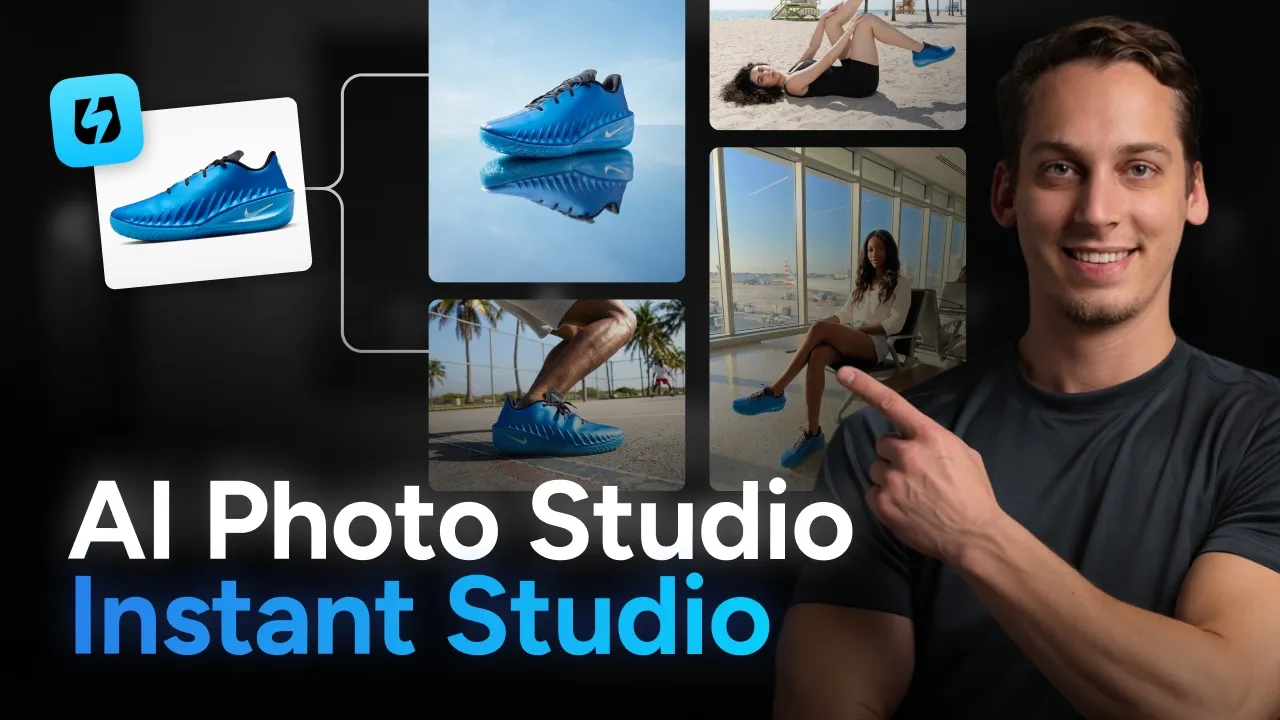
There’s a wide variety of tools in this space: some focus on editing/enhancing your existing images, while others can generate a fully AI-generated image after you send examples of what your product looks like. When evaluating different tooling options, be sure to consider which types of photos you want to create and how custom you want your images to be. And be careful to test your tool to ensure photos look realistic, not like AI-generated slop.
Why use AI for product photography?
There are many reasons why brands might opt for AI solutions for product photography, but for most, it boils down to cost savings, time efficiency, consistency, flexibility in experimentation, and a faster time to market. Here’s a quick look at each of these use-cases.
- Cost savings with AI photography: Traditional photography for ecommerce brands can be quite expensive, with costs ranging from $50 to $500 per image. This means that a subscription to an AI photography tool might cost less than even a single image. For example, a Midjourney subscription is only $10 per month for a basic plan.
- Time efficiency: Traditional photoshoots may take days or weeks to organize photoshoots and receive all the edited images. In contrast, images made with AI can be generated in minutes. This can help with scalability for brands with large catalogs of 100s to 1000s of products.
- Consistency and brand control: One of the key concerns for brands creating product images is maintaining consistency across their entire catalog, ensuring the same lighting and style for every product. With AI tools, you can create a template for your brand to ensure all photos align with brand guidelines and feel cohesive.
- Flexibility for experimentation: AI photography makes it much easier for brands to A/B test their images to optimize their campaigns for top performance. This could include swapping in different backgrounds, trying different lifestyle contexts, adding seasonal variations (holidays, summer, etc.), or localizing photos for different markets.
- Faster time to market: Because product images can be created far faster with AI assistance, the time to launch for marketing campaigns is greatly reduced. This allows brands to launch products faster, respond to viral trends, and update images in real time.
Given all of these potential benefits, AI product photography may make a lot of sense for brands with high-volume catalogs, frequent product launches, limited budgets, experimentation/testing needs, or dropshipping businesses.
AI product photography vs traditional photography
Although AI-generated images can work well for many brands, they might not always be the right fit for every use-case. For example, Coca-Cola sparked backlash for an AI-generated Christmas ad due to visual quality issues. That’s why it is important to consider different factors when deciding whether traditional or AI photography is a better choice for your specific situation:
| Factor | Traditional Photography | AI Photography |
|---|---|---|
| Cost per image | $50-500+ | $0-10 |
| Time per image | Hours-Days | Minutes |
| Scalability | Limited | Unlimited |
| Flexibility | Low (requires reshoot) | High (instant changes) |
| Quality | Very High | High (improving rapidly) |
| Authenticity | 100% Real | AI-Generated |
| Best for | Hero images, brand campaigns | Catalog images, variations, testing |
A hybrid approach is a third option that can enjoy the benefits of both approaches. For example, your brand could use traditional images for brand storytelling and UGC, while using AI for category expansion, lifestyle variations, or faster launches.
Best AI product photography tools for 2026
There has been an explosion in AI photography tool solutions in the last few years. To keep our recap of the best tools relevant, we will focus on AI photo tools created specifically for eCommerce use-cases.
1. Instant Studio
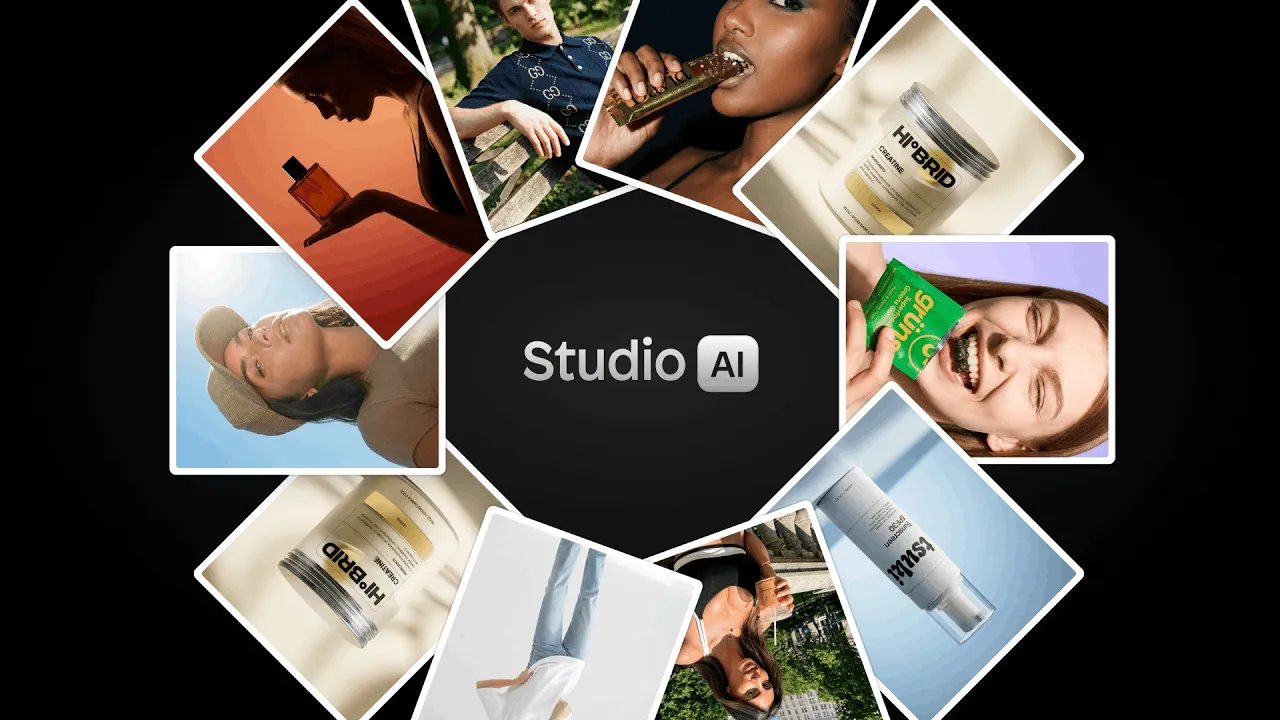
Best for: eCommerce brands, fashion/apparel sellers, Shopify stores
Instant Studio stands out as the only AI product photography tool built specifically for eCommerce sellers with direct Shopify integration. Unlike generic AI image generators, Instant Studio offers two specialized creation modes: packshots for professional product backgrounds and AI avatar models for lifestyle shots, making it perfect for fashion brands that need products shown on models.
Key Features:
- Create both packshot backgrounds and lifestyle images with AI avatars
- Choose from dozens of diverse pre-made avatars or build custom ones from scratch
- Full avatar customization: adjust body type, age, hair, makeup, and pose
- Direct Shopify integration: create images and use them immediately in your store
- Export across all channels (social media, ads, marketplaces)
- Credit-based system included with Instant AI Page Builder subscription
Pricing: Included with Instant AI Page Builder subscription; additional credit packages available
If you're a Shopify seller who needs both product packshots and model photography, Instant Studio delivers professional results without the photoshoot price tag.
2. Leonardo AI
Best for: Artists, marketers, and businesses needing versatile AI image generation with extensive model options
Leonardo AI is a powerhouse creative platform offering access to 64+ specialized AI models under one subscription. Unlike single-purpose tools, Leonardo provides everything from photorealistic product shots (via PhotoReal V2 pipeline) to stylized concept art, all within a comprehensive creative suite that includes real-time canvas editing, 3D texture generation, and video capabilities.
Key Features:
- Access to multiple fine-tuned models (Leonardo Diffusion XL, PhotoReal, community models)
- Custom model training with your own images (10-20 photos)
- Real-time Canvas for live editing and refinement
- AI Motion for animating still product images
- Universal Upscaler for 4K+ resolution exports
- Image-to-image, text-to-image, and background generation
Pricing: Token-based system
- Free: Limited daily tokens for testing
- Artisan: $12/month (8,500 fast tokens + unlimited relaxed generation)
- Maestro: $30/month (25,000 fast tokens + unlimited relaxed generation)
- Token top-ups available for heavy users
Leonardo AI excels at creative versatility but isn't purpose-built for eCommerce. If you need one tool for multiple creative use cases and have time to learn the platform, it's incredibly powerful.
3. Higgsfield AI
Best for: Video-first creators, fashion brands, and social media marketers who need dynamic product content
Higgsfield AI is the AI video platform founded by Snap's former head of generative AI. While it can generate product photos, its real superpower is turning static product images into cinematic brand videos with professional camera movements, making it perfect for TikTok, Instagram Reels, and video ads.
Key Features:
- Product-to-Video: Upload a product photo, get a polished video ad in minutes
- 50+ camera movements: Crash zooms, crane shots, dolly zooms (all cinematic techniques)
- Fashion Factory: Complete fashion photoshoot generation from a single product image
- Shots: Turn one image into 9-panel cinematic grid with all angles
- Soul: Ultra-realistic fashion-grade photo model
- Higgsfield Soul Inpaint: Edit specific areas while preserving everything else
- Cinema Studio: Professional camera control and composition
- WAN 2.5 & Nano Banana Pro: Specialized models for product photography
Pricing: Credit-based
- Ultimate plan: $49/month
- Access to 12+ AI video models (Google Veo 3, Runway, Kling, etc.)
- Alternative to subscribing to multiple platforms separately
If you need video content for social media or ads, Higgsfield is unmatched. The Fashion Factory and Soul features make it particularly powerful for apparel brands.
4. Krea AI
Best for: Creative professionals and teams needing real-time AI generation with instant visual feedback
Krea AI delivers blazing-fast real-time image generation (under 50 milliseconds) with access to 64+ cutting-edge AI models, including Google Veo 3, Runway, Flux, and their proprietary Krea 1 model. Think of it as a creative Swiss Army knife - it's not specialized for product photography, but it's incredibly versatile with powerful real-time editing that lets you see changes as you make them.
Key Features:
- Real-time generation: Draw and watch AI create instantly (revolutionary for iteration)
- 64+ AI models: Access to Google Veo 3, Runway, Flux, Luma, Ideogram, Krea 1
- Wan 2: Ultra-realistic model for product visualization
- Nano Banana Pro: Specialized for commercial product photography and material accuracy
- Enhancer: Upscale images to 22K, video to 8K
- 3D Objects: Generate 3D models from text or images
- Video capabilities: Text-to-video, image-to-video, video restyle
- Nodes: Create automated workflows for repetitive tasks
Pricing: Compute-based credits
- Free: 50 generations/day (with watermark, no commercial use)
- Basic: $9/month
- Pro: $35/month
- Max: $105/month
- Business: Team-based (not seat-based), starting at $200/month
Krea AI is powerful and versatile but lacks eCommerce-specific features like Shopify integration or product-specific workflows. It's best for creative professionals who need multiple capabilities (image, video, 3D) rather than eCommerce sellers focused solely on product photography.
5. Kive AI
Best for: Creative teams and brands needing AI generation + smart asset management in one platform
Kive AI is the only platform that combines powerful AI product photography with intelligent asset management and team collaboration. Unlike pure generation tools, Kive acts as both a creative engine and a brand library, every image you generate automatically lives in your organized workspace with version history, search, and sharing capabilities built in.
Key Features:
- Product Shots: Train custom AI on your products, generate unlimited on-brand scenes
- Multi-product scenes: Place multiple products in one shot (rare capability)
- Studio presets: Prompt-free visual templates for instant professional looks
- AI upscaling: Export crisp 4K assets ready for print
- Image-to-video: Turn stills into social-ready motion content
- Smart library: Auto-tagging, search by visual similarity, version control
- Team collaboration: Shared boards, feedback tools, brand guidelines
- Cloud-based: Access from any device, nothing to install
Pricing:
- Free: $0/month (300 AI-tagged items, 5 boards, 5 guests)
- Basic: $15/month ($15/month or $20 monthly)
- Pro: $75/month ($75/year or $100 monthly) - 10 users, 50K library items, 5K monthly credits
- Enterprise: Custom (unlimited AI products, custom limits, personal onboarding)
Kive is purpose-built for brands and agencies, not solo sellers. If you're a one-person shop, the asset management and collaboration features are wasted. But for growing businesses or teams creating lots of content, Kive's combination of AI generation + organization + collaboration is unmatched.
6. Kittl
Best for: Print-on-demand sellers, graphic designers, and creators making logos, t-shirts, and branded graphics
Kittl is an AI-first graphic design platform, not a product photography tool. While it can generate product images, its real strength is creating designs for products, think t-shirt graphics, logos, posters, and social media content. If you're selling print-on-demand or need branded graphics (not product photos), Kittl is incredibly powerful.
Key Features:
- AI image generation: Access to top models (ChatGPT Image 1, Google Imagen 4, FLUX 1.1 Pro, Ideogram, DALL-E 3)
- AI text effects: One-click typography transformations
- 10,000+ templates: Professional designs for t-shirts, posters, social media
- 1,400+ premium fonts: Including Helvetica and trending typefaces
- AI background remover: Clean product cutouts
- AI vectorizer: Convert images to scalable vector files
- Mockup generator: Visualize designs on products
- Infinite canvas: Work on multiple projects simultaneously
- Brand kits: Maintain consistent colors, fonts, logos (Expert plan)
Pricing: AI token-based
- Free: $0/month (5 projects, 200 AI credits one-time)
- Pro: $15/month (200 AI credits/month)
- Expert: $30/month (6,000 AI credits/month)
- Max : $65/month (12,000 AI credits/month)
- Business: Custom for teams
Kittl is excellent at what it does (graphic design for products), but it's not a product photography tool. If you need to photograph your candles, jewelry, or clothing, Kittl won't help. But if you're creating graphics for t-shirts, stickers, or posters to sell on Etsy/Redbubble, Kittl is purpose-built for that.
7. ComfyUI
Best for: Advanced users, developers, and technical creatives who want complete control over AI workflows
ComfyUI isn't a simple app, it's an open-source, node-based visual programming environment for AI image generation. Think of it as the "developer mode" for AI art. You build custom workflows by connecting nodes (like Lego blocks) for maximum control and customization. It's incredibly powerful for product photography but requires technical knowledge and patience.
Key Features:
- Node-based workflow builder: Visual programming for complete customization
- Product photography workflows: Community-created templates for professional product shots
- IC-Light integration: Advanced relighting for realistic product integration
- Frequency separation: Preserves fine details while changing backgrounds
- ControlNet support: Maintain product shape and consistency
- Segment Anything (SAM): Precision masking and background removal
- Multiple model support: Use Stable Diffusion, Flux, and custom models
- Batch processing: Automate repetitive tasks at scale
- Local or cloud: Run on your own hardware or use Comfy.org's cloud service
Pricing:
- Self-hosted: Free (open-source) but requires GPU hardware
- Comfy.org Cloud: Subscription-based access (eliminates hardware requirements)
- Hardware costs: If self-hosting, need powerful GPU ($500-2000+)
ComfyUI is for power users, not beginners. If you're comfortable with technical tools, have time to learn, and need maximum control, it's incredibly powerful (and free).
8. Photoroom
Best for: Multi-channel e-commerce sellers who need a versatile, standalone AI photo tool that works across platforms.
Photoroom is one of the most popular AI photo editing tools for e-commerce sellers, and for good reason. It covers the full range of product photography needs: AI product staging, background removal, virtual models, image beautification, and even product animation, all in a clean, intuitive interface that works on both desktop and mobile.
It's particularly strong for sellers who operate across multiple channels. Whether you're listing on Shopify, Amazon, Etsy, or posting to Instagram, Photoroom gives you the flexibility to create and export images formatted for any platform. The batch editing feature is a standout for anyone managing a large product catalog, letting you process hundreds of images in one go.
Plans start at €9.99/month for the Pro tier, scaling up to €99/month for the Ultra plan with access to the best AI models and advanced workflows. It's worth noting that Shopify listing integration is only available on the Max plan (€26.99/month) and above.
9. Claid
Best for: brands that need high-resolution outputs and image enhancement alongside AI generation.
Claid is an AI-powered product photography tool built for eCommerce brands that want polished visuals without the cost of traditional shoots. It covers everything from background removal and image enhancement to full AI-generated product photos and lifestyle scenes with virtual models.
One of its standout features is high-resolution output, including 4K image generation, along with tools for lighting and colour correction. Claid also supports simple animations, letting you turn product images into short video clips or GIFs. While it’s a strong option for creating and refining visuals, it works as a standalone platform, so images still need to be exported and uploaded manually to your store.
Quick tool comparison table
| Tool | Best For | Pricing (Starting) | Ease of Use | eCommerce Focus | Unique Strength |
| Instant Studio | Shopify sellers | Included in Page Builder | ⭐⭐⭐⭐⭐ | ⭐⭐⭐⭐⭐ | Direct Shopify integration |
| Leonardo AI | Versatile creators | $12/month | ⭐⭐⭐ | ⭐⭐ | 64+ AI models access |
| Higgsfield AI | Video marketers | $75/month | ⭐⭐⭐⭐ | ⭐⭐⭐ | Product-to-video generation |
| Krea AI | Creative professionals | $10/month | ⭐⭐⭐ | ⭐⭐ | Real-time generation speed |
| Kive AI | Creative teams | $15/month | ⭐⭐⭐⭐ | ⭐⭐⭐⭐ | Asset management + generation |
| Kittl | Print-on-demand | $15/month | ⭐⭐⭐⭐⭐ | ⭐ | Graphic design (not photos) |
| ComfyUI | Technical users | Free (self-host) | ⭐ | ⭐ | Ultimate customization |
If you're looking specifically for Shopify tools, read more about Shopify AI image generators.
How to use AI for product photography
To use AI for product photography with Instant Studio, all you need is a basic image of your product. This can even be an image you snap with your phone camera. Upload it to Instant Studio, select the scene (background) type you want, and add any additional details to the prompt, then click to generate a packshot. You can also create lifestyle images with AI avatars. Edit pre-created avatars or create your own model from scratch using prompting. You can also select different aspect ratios for your images for different channels. Once you’re happy with your images, export them or integrate them directly into your Shopify designs.
AI product photography for specific industries
Not all products are created equal, and neither are their photography needs. What works for a candle won't work for a cocktail dress, and what sells a laptop won't sell a leather sofa. Understanding your industry's specific requirements is crucial to creating AI product photography that converts.
In this section, we'll break down exactly how to use AI product photography for five major eCommerce industries.
A. Fashion & Apparel
AI product photography for fashion and apparel is especially useful, particularly with AI avatar models.
According to Baymard Institute's research, products designed to be worn require the context of a human model to give users the truest sense of the product, as without this context, users must estimate suitability based on less helpful images, resulting in lower confidence and lower likelihood to purchase. For example, a t-shirt photo with AI photography can inspire shoppers a lot more than a basic flat lay.
Best use-cases:
Different model demographics:
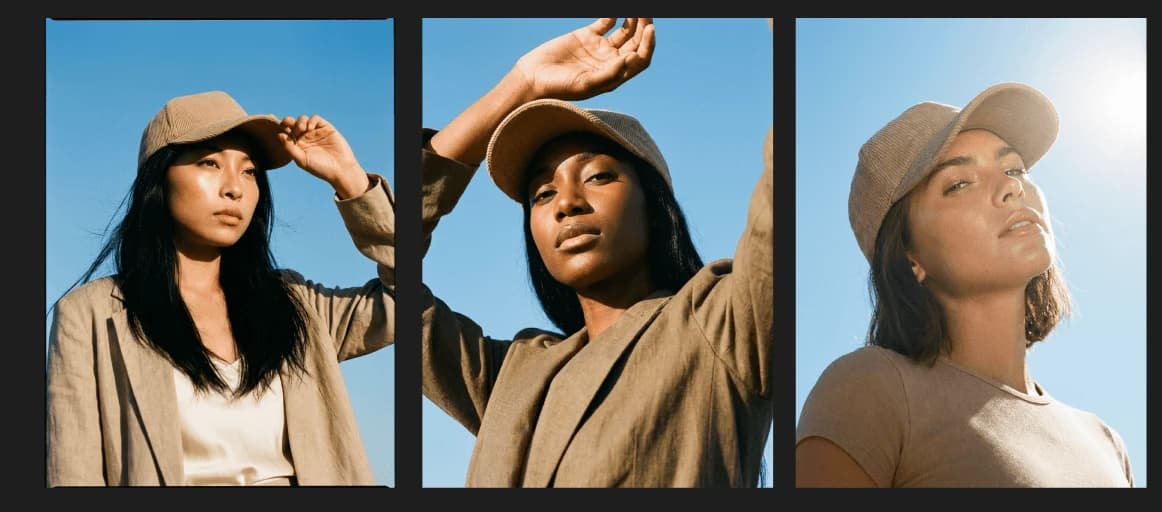
One of AI's biggest advantages is representation at scale. Instead of hiring multiple models for a single photoshoot, you can show the same product on:
- Different body types (petite, plus-size, tall, athletic)
- Various ethnicities and skin tones
- Multiple age ranges (20s, 30s, 40s+)
- Different style presentations (casual vs. dressed up)
When customers see models that look like them, conversion rates increase. Inclusive representation isn't just ethically right, it's profitable. AI makes this financially feasible for small brands.
Seasonal context
Show your products in seasonal settings without waiting for the actual season or organizing outdoor photoshoots:
- Summer: Beach backgrounds, outdoor festivals, sunny parks
- Fall: Cozy cafes, autumn leaves, layered styling
- Winter: Snowy settings, holiday parties, cold-weather contexts
- Spring: Blooming gardens, fresh outdoor scenes
B. Jewelry & Accessories
Jewelry and accessories require a delicate balance: showing exquisite detail while providing scale and lifestyle context. These products are often small, reflective, and challenging to photograph, but AI excels at creating the luxury aesthetic jewelry demands.
Key use cases:
1. Lifestyle shots (On hand, on model)
Jewelry looks completely different on a person versus on a white background. Accessories such as bags, jewelry, or watches require the context of a human model in order to get the truest sense of the product.
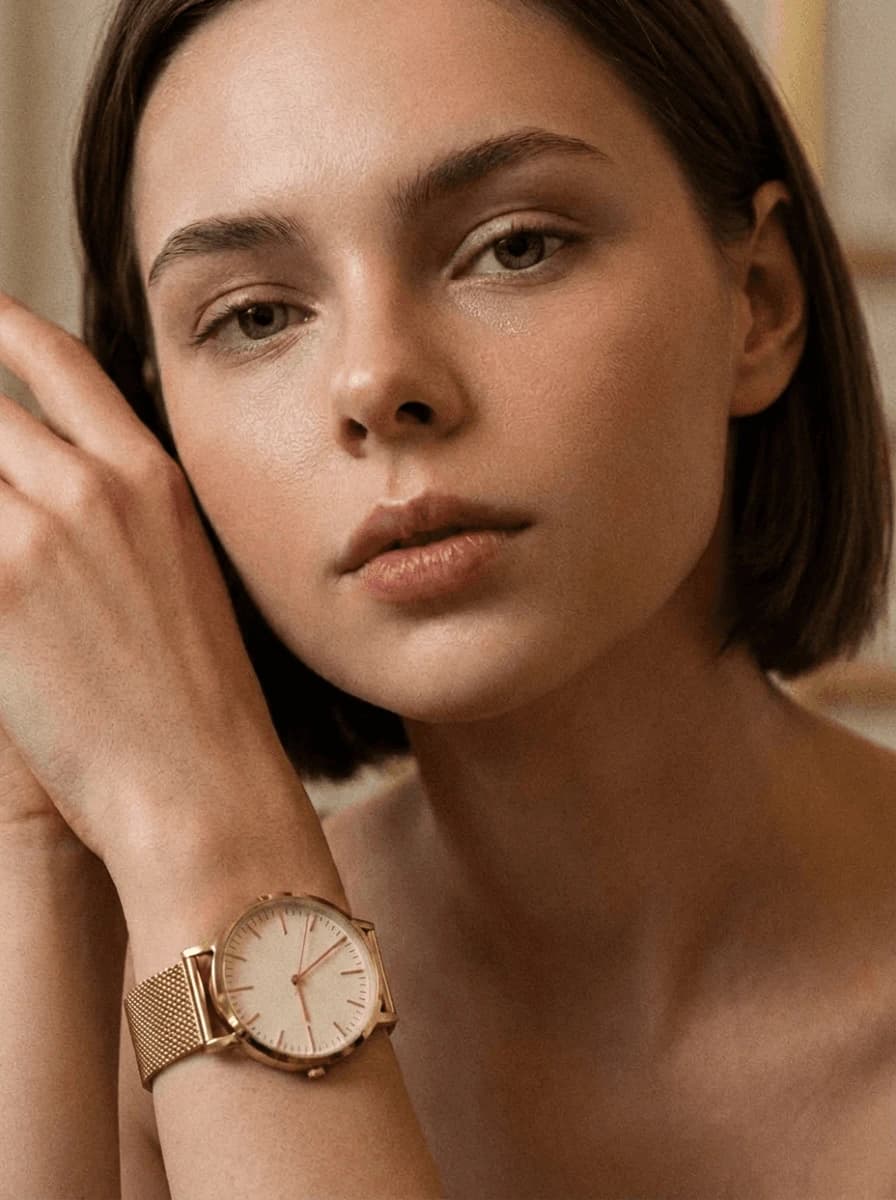
Create these essential shots with AI:
- Ring on hand: Shows size, shine, and how it sits on the finger
- Necklace on model: Displays length, how it lays on the chest
- Bracelet on wrist: Shows scale and how it drapes
- Earrings on model: Demonstrates size relative to face
- Watch on wrist: Critical for showing actual size and proportion
2. Luxury background scenes
Jewelry deserves elegant settings that communicate value:
- Marble surfaces with soft shadows
- Velvet or silk fabric backgrounds
- Minimalist luxury aesthetic (think Cartier, Tiffany)
- Editorial-style compositions with complementary props
- Moody, dramatic lighting for high-end pieces
3. Close-up detail enhancement
Show the craftsmanship that justifies the price:
- Stone clarity and cut
- Metalwork detail and finish
- Engraving or personalization
- Clasp and closure details
- Texture of materials (hammered, polished, brushed)
C. Home & Furniture
Determining the size of a product is crucial to the online shopping experience, as users can't physically evaluate the size of a product as they can in a brick-and-mortar store. For home goods and furniture, AI product photography solves the biggest challenge: helping customers visualize products in their own spaces.
Key use cases:
1. Room scene generation
The most powerful application of AI for furniture and home decor:
- Show sofas in complete living rooms
- Place lamps on styled nightstands
- Display rugs in furnished spaces
- Style throw pillows on actual couches
- Present wall art in decorated rooms
2. Different interior styles
Appeal to various design preferences by showing the same product in multiple styles:
- Modern minimalist: Clean lines, neutral colors, simple spaces
- Bohemian: Layered textures, plants, warm tones
- Traditional: Classic furniture, rich woods, formal arrangements
- Industrial: Exposed brick, metal accents, urban loft aesthetic
- Scandinavian: Light woods, whites and grays, cozy hygge vibes
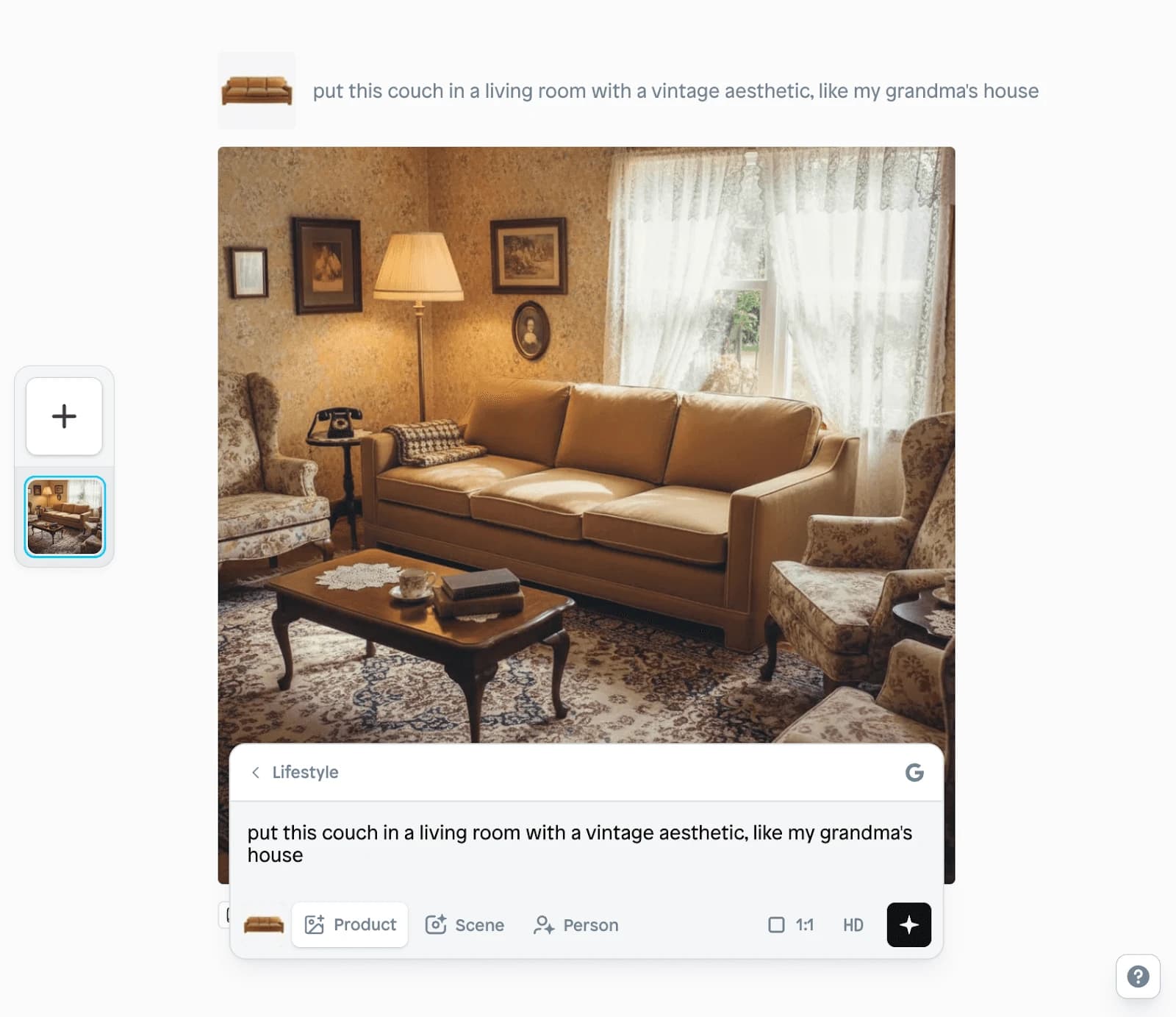
3. Scale in context
Without the frame of reference provided by "in scale" images, users may develop misconceptions about a product's size. AI helps provide critical scale:
- Furniture relative to room size
- Decor items next to common objects (books, vases, lamps)
- Rugs showing coverage area in furnished rooms
- Wall art sized appropriately on walls
D. Electronics & Gadgets
Electronics present unique challenges: they need to look cutting-edge and professional, show functionality clearly, and communicate technical sophistication. AI product photography helps tech products stand out in a crowded market.
Key use cases:
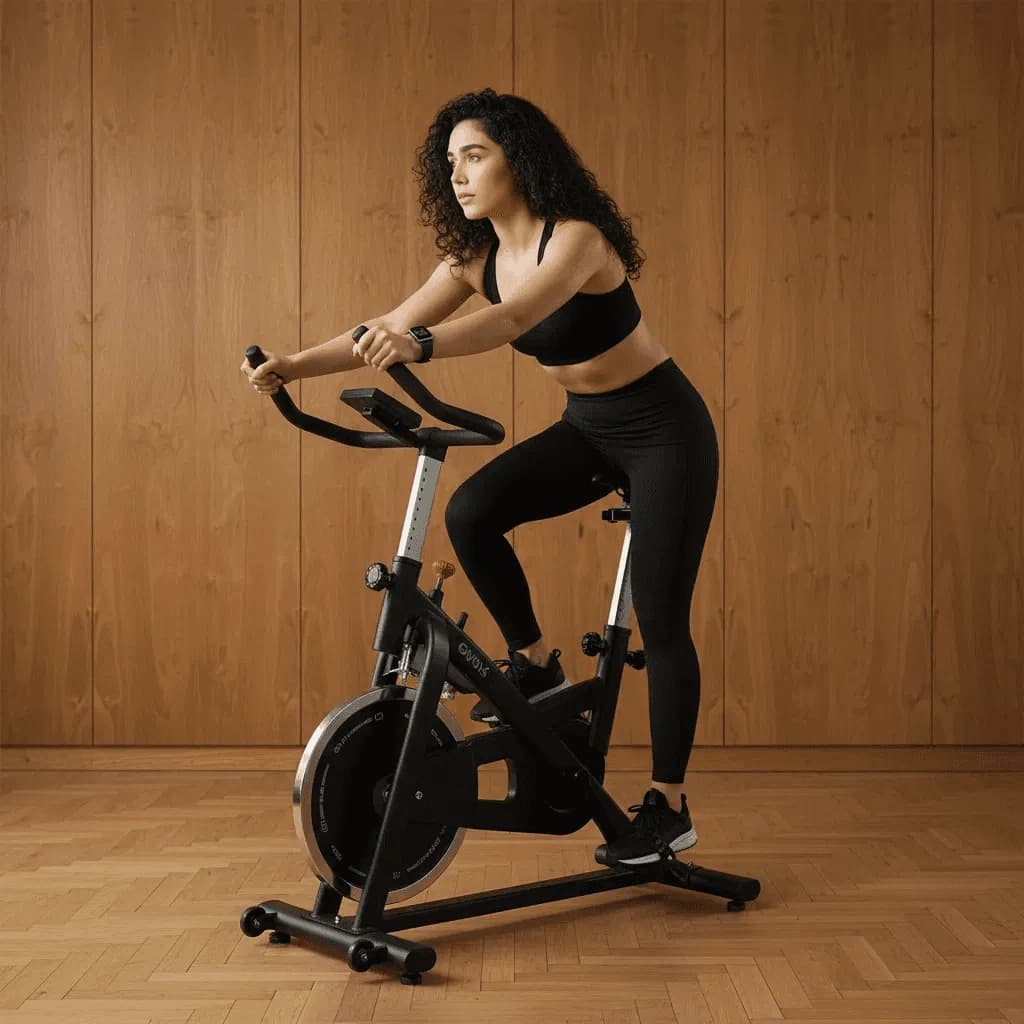
1. Lifestyle usage scenarios
Customers need to envision themselves using your product. Show your electronics in action, not just sitting on white backgrounds:
- Headphones on a commuter, at the gym, working from home
- Smartwatches worn during workouts, meetings, daily activities
- Laptops in coffee shops, home offices, co-working spaces
- Cameras being used at events, on trips, in studios
- Gaming gear in complete gaming setups
2. Professional studio shots
For technical specifications and detail, clean studio shots are essential:
- Multiple angles (front, back, sides, top-down)
- Clean, gradient backgrounds (white, gray, black)
- Even lighting that shows ports, buttons, details
- Product alone to showcase design and build quality
When to use: For main product images, specifications pages, comparison charts, and technical listings (like Amazon).
3. Feature highlights
Show what makes your product special:
- Camera lenses with zoom capabilities
- Speaker grills showing sound quality cues
- Screen clarity with mockup content displayed
- Port selection (USB-C, HDMI, SD card slots)
- Touch controls or button layouts
- Size comparison next to common objects (phone, hand, coins)
E. Food & Beverage
Food photography is notoriously difficult, lighting, styling, and timing must be perfect to make food look fresh and appetizing. AI product photography offers new possibilities while respecting the unique challenges of food imagery.
Key use cases:
1. Appetizing presentations
Food must look fresh. Wilted, stale, or unappetizing food imagery kills conversions instantly.
- Coffee beans in rustic wooden bowls with steam rising from a cup
- Craft beer bottles in bar settings with condensation droplets
- Artisan chocolates on elegant serving boards
- Spice jars surrounded by fresh ingredients
- Gourmet sauces drizzled on dishes

2. Usage scenarios
You're not just selling food, you're selling the experience and feeling of consuming it. Show the experience, not just the product:
- Morning coffee ritual (cozy kitchen, morning light, breakfast spread)
- Dinner party hosting (wine bottles, elegant table settings)
- Meal prep and cooking (ingredients in action, cooking process)
- Snacking moments (office desk, hiking trail, movie night)
- Gift-giving occasions (beautiful packaging, celebration contexts)
3. Ingredient highlighting
Show what makes your product special:
- Organic ingredients: Fresh vegetables, natural elements
- Origin story: Coffee beans from specific regions, local farms
- Craftsmanship: Handmade chocolates, small-batch production
- Quality indicators: Premium packaging, artisan presentation
- Freshness cues: Dewy produce, steaming beverages, melting cheese
Industry-specific use-cases AI versus traditional photography
| Industry | Critical success factor | AI use cases | When to use traditional |
|---|---|---|---|
| Fashion | Model context for fit | AI avatars showing products on diverse models | Hero campaign imagery, fabric close-ups requiring extreme detail |
| Jewelry | Scale reference + luxury aesthetic | Lifestyle shots (on model hands/neck), luxury backgrounds | Extreme close-ups of gemstones, macro photography |
| Home Goods | Room integration + scale | Complete room scenes, different interior styles | Large furniture requiring precise dimensions, complex upholstery |
| Electronics | Professional appearance + usage context | Lifestyle usage scenarios, clean studio shots | Products with screens requiring interface accuracy |
| Food | Freshness appearance | Packaged products in scenes, background enhancement | Fresh prepared food, dishes requiring perfect timing |
Final thoughts on industry-specific AI photography
The key to successful AI product photography isn't treating all products the same; it's understanding what your specific industry requires and using AI strategically to deliver those requirements at scale.
With tools like Instant Studio, you can create industry-specific imagery that meets these needs:
- For fashion: Generate diverse AI avatar models showing fit and style
- For jewelry: Place products on models and in luxury settings
- For home goods: Create complete room scenes in various interior styles
- For electronics: Show products in modern lifestyle contexts
- For food: Style packaged products in appetizing scenarios
The best approach? Use AI for volume and variations, traditional photography for hero moments, and always prioritize accuracy over perfection.
Your customers don't care how you created the images; they care whether the images help them make confident purchase decisions. Industry-specific AI photography, done right, delivers exactly that.
AI product photography best practices
When using AI tools to create product imagery, there are a number of guidelines to keep in mind:
1. Maintaining authenticity
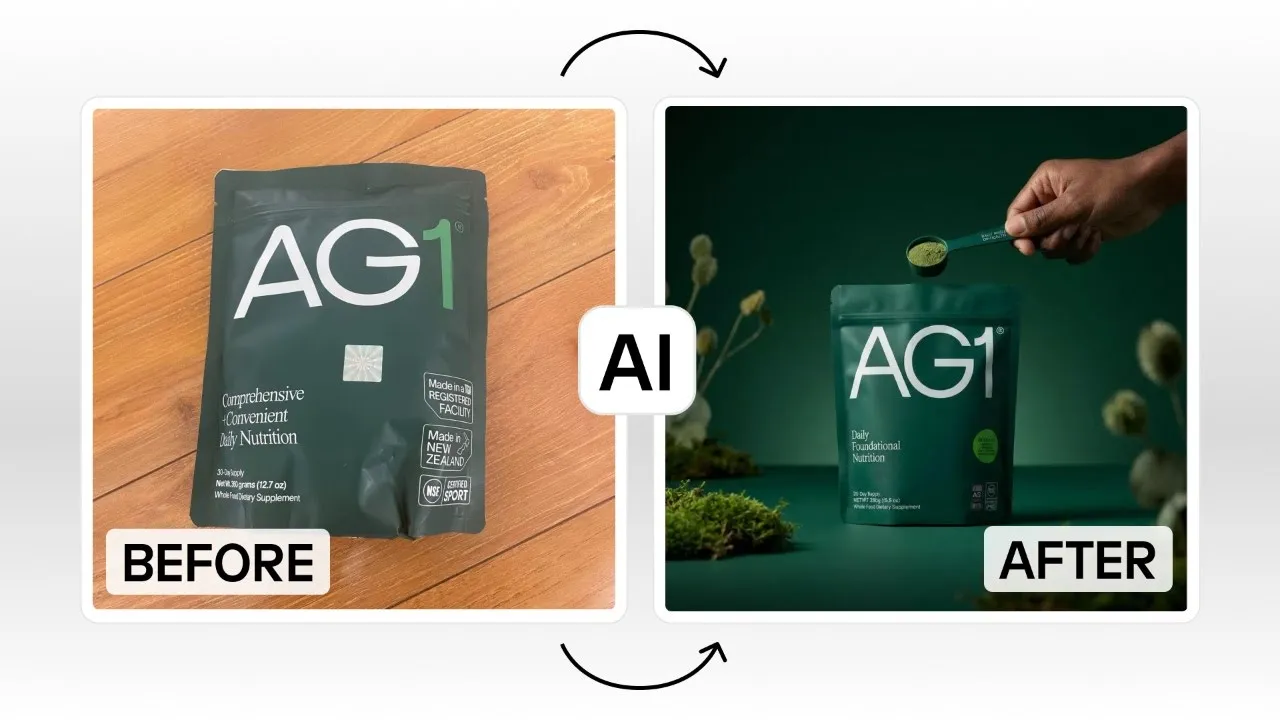
It is important to ensure that, even if you use AI-generated images, they accurately depict your product. If you do not set realistic expectations, then your store might face a lot of returns, bad reviews, and unhappy customers. Not all AI tools are created equally, so picking a tool that creates images of as good quality as your real photography is important. If something cannot be accurately depicted yet with AI, balancing out AI photos with real photos can work.
2. Brand consistency
When scaling your use of AI photos, it can be helpful to create style templates so that all of your images have the same feel. This includes consistent lighting, angles, color palettes, and the environment/context of your products.
3. Quality control
Look out for the following issues when creating your images with AI:
- Unrealistic shadows
- Proportion issues
- Lighting inconsistencies
- Background artifacts
- AI hallucinations like extra fingers
Use a manual review process to double-check your generations, and when in doubt, regenerate your images. If it feels weird or eerie to you, it will likely scream "AI" to your shoppers.
4. A/B testing your AI images
If you’re unsure about switching to AI images, you could start by A/B testing to see whether there’s a noticeable impact on conversions when using AI versus traditional images. If you’ve decided to use AI imagery in your store design, you could experiment with different backgrounds, different styles of images, like lifestyle versus studio shots, or adding different models.
The conversion impact of AI product photography is something that is just starting to be understood, so testing the impact yourself is a great way to understand what works for your brand.
5. Legal and ethical considerations
As is true with any AI-generated content or product photography used, there are legal and ethical considerations, such as the copyright of your images, disclosure requirements for AI-generated image use, and compliance with specific platform or country-specific advertising regulations. For example, using AI to create a fake product listing based on a different brand would be unethical.
Common mistakes to avoid with AI photo generation
1. Using low-quality source images
It is amazing what AI can create from a grainy, blurry image of your product. But the quality of the content you input will impact the accuracy of the output you receive. For example, products that have writing on them could be misrepresented if the AI cannot accurately capture the text. This could lead to images that are obviously AI with weird, nonsensical text. Be sure your source images are against a neutral background with decent lighting. If you notice your AI-generated images are not realistic, adjusting your source image may make a big difference!
2. Over-relying on AI
There are some cases where traditional photos are going to be better. For example, a big campaign that will show up on your homepage hero. This is a place where you want to scream authenticity and build trust with your audience. If you cannot create such an image with AI, it might be worth the investment to use a traditional image.
3. Ignoring brand consistency
Just like you would brief a photographer when hosting a traditional photoshoot, you need to create guidelines for brand consistency for your AI tools. This means creating templates, a style guide, and examples of what is and is not acceptable.
4. Unrealistic backgrounds
The quality of the background can make or break your photos. It’s important to match the product to an appropriate scene, ensure lighting coherence, and resolve any scale and perspective issues.
5. Forgetting mobile optimization
76% of mobile sites forget to optimize their product image thumbnails, according to Baymard. This is important whether or not you are using traditional or AI images. With over 50% of shopping occurring on mobile devices, forgetting to optimize across screen sizes can really hurt your bottom line.
6. Neglecting image variations
When creating AI images for product pages, it is important to create images that can fill up a product gallery. This means creating multiple angles, zooming in on specific features and details, and creating lifestyle shots.
7. Giving unclear prompts
The quality of the AI image prompts you give a tool makes all the difference in terms of the output. Try being specific, and writing in sentences instead of fragmented keywords.
The future of AI product photography
Product photography generated by AI is just the starting point. There are many tools that are starting to emerge to capture other popular types of product content, such as:
- 3D product visualization: with 360° product rotation, AR try-on experiences, and virtual showrooms.
- Hyper-personalization: including AI images personalized to viewer, localized scenes by geography, demographic-specific models.
- Video product content: with full videos showing the product or giving how-to demos.
In the next few years, we can expect the quality of AI generation to be even more realistic and creative, potentially even providing styling recommendations to make image creation even easier.
Conclusion
AI photo generation is transforming content creation in eCommerce, giving growing brands the ability to achieve the production quality of a brand with 3-4x their budget. The massive cost and time savings potential can also enable scaling brands to launch faster, to jump on opportunities while they are still hot. There is a lot of competition in this space with more tools popping up every day, which is pushing tools to develop even better features and better quality images. To test out the potential of AI photography in your store design, begin by using AI images to complement your traditional photography, and see what performs better. With so many tools out there, it is easy to get started with free trials.
We are just at the beginning of this space, and the early adopters will have a big advantage by learning and understanding the potential and possibilities of this technology, while the barrier to entry is lower than ever. Try creating your first AI-generated photo image today in Instant Studios.