Selling clothing online depends on one thing more than almost anything else: photos.
Customers won’t buy what they can’t picture themselves wearing. Flat lays don’t convert well, and ghost mannequins only go so far. What actually sells apparel is on-model imagery; but producing it is expensive, slow, and hard to scale. Every new collection means booking a photographer, finding models, organizing styling, coordinating locations, and paying for editing. For brands releasing 40–50 SKUs a season, photography quickly becomes one of the biggest operational costs in the business.
That’s why fashion is one of the few categories where generic AI image generators don’t really work. Apparel photography isn’t just about making a nice image; it needs realistic fabric texture, accurate fit, consistent models, and lifestyle context that matches the brand. Most AI tools can generate backgrounds or product shots, but they struggle with clothing because garments have to behave correctly on a body.
In this guide, we’ll break down what fashion brands should actually look for in an AI product photography tool, how to evaluate the current options, and how Instant Studio approaches apparel specifically, including its model-swapping workflow designed for high-volume catalog production.
1. What makes fashion product photography different (and harder)
Before comparing AI tools, it helps to be clear about why fashion is such a difficult category. Apparel photography has requirements that most other products simply don’t.
Garments have to be shown on a body
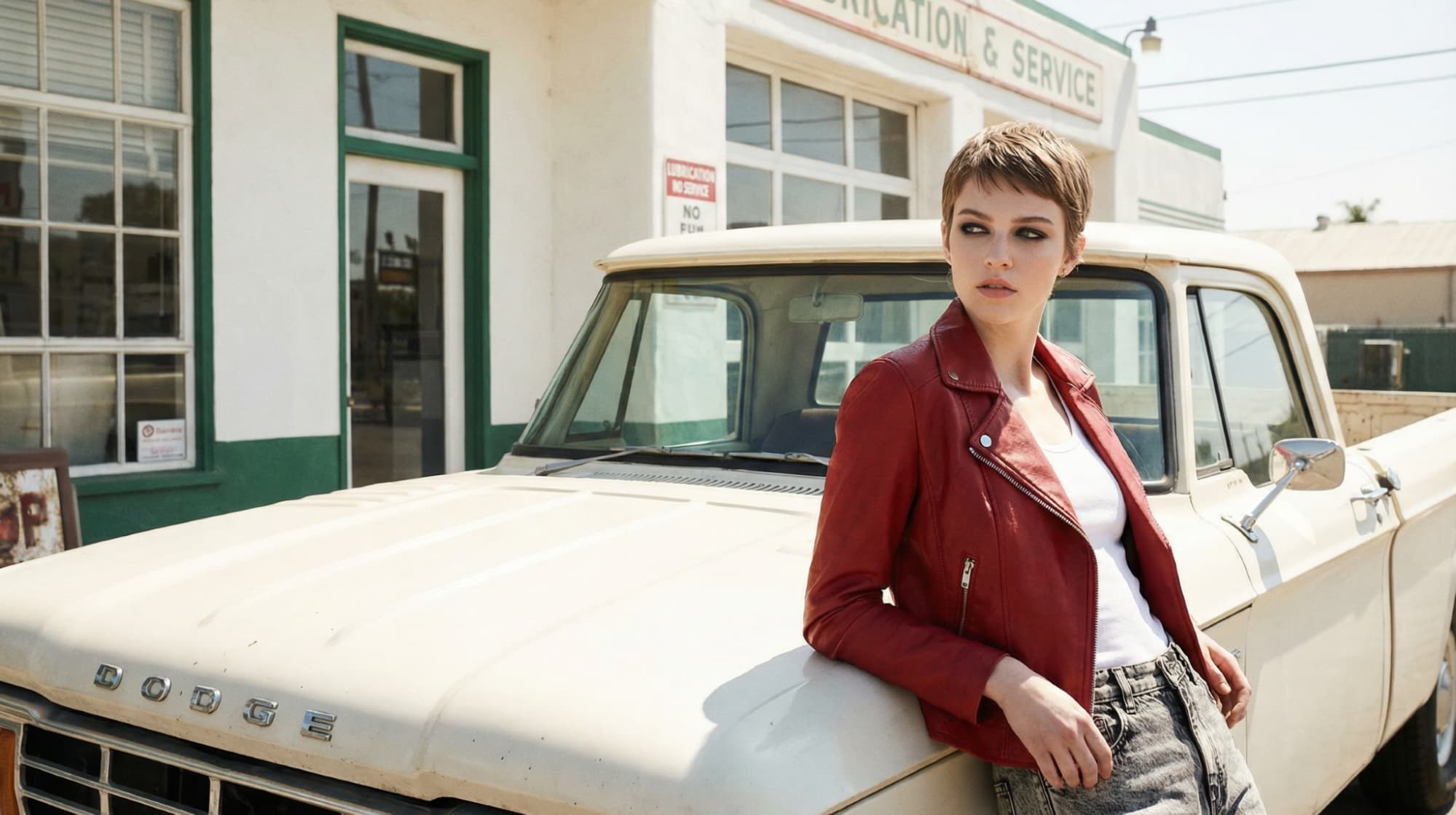
A t-shirt photographed as a flat lay tells you almost nothing about how it actually fits, how the fabric moves, or how it looks as part of an outfit. Fashion is a body-dependent category; the model is not decoration, it is a functional part of the product image. The quality of on-model photography directly affects purchase intent, return rates, and brand perception. That's why brands can use AI product photography for t-shirts and other popular garments.
Fabric is difficult to render correctly
Clothing is one of the hardest product types for AI to handle. Fabric folds, stretches, and reacts to light differently depending on the material. A silk blouse, a structured blazer, and a cotton jersey shirt all behave differently on a body.
Many AI image tools perform well with hard products like electronics or packaged goods. Soft goods are another problem entirely. If the fabric looks fake, stiff, or inconsistent across images, customers notice immediately. For fashion brands, realistic fabric rendering is the first technical requirement, not a nice bonus.
Design details have to stay accurate
Fashion garments often have design details that are as important as the overall silhouette, embroidery, print placement, graphic details, hardware, stitching, texture. These details need to survive the AI generation process accurately. A tool that blurs a graphic print, distorts a pattern repeat, or misrepresents the scale of a hardware detail is producing imagery that will mislead customers and increase returns. Design fidelity is non-negotiable for fashion photography.
Model diversity is a commercial requirement
Customers want to see clothing on people who resemble them. Showing every product on one model limits both trust and conversions.
When shoppers can view a garment on different body types, skin tones, or ages, they understand fit more clearly and feel more confident buying. For fashion brands, representation is not just branding. It directly affects sales performance. AI product photography with models can make scaling diversity easier.
Fashion moves fast
Fashion brands turn over inventory at a rate that most other product categories don't approach. Seasonal drops, limited edition releases, colorway expansions, collaboration capsules, fashion catalogs grow and refresh at pace. The photography workflow has to be able to keep up. A service that is slow, expensive per image, or difficult to scale across a growing catalog is an operational bottleneck, not a solution.
2. What to look for in the best AI product photography tools for apparel
Given the specific demands of fashion photography, the criteria for evaluating AI tools in this category are stricter than for general product photography. Here is the framework for identifying the best AI product photography tools for apparel.
How to evaluate AI fashion product photography tools
Criterion | What strong performance looks like | What poor performance looks like |
|---|---|---|
Fabric rendering | Natural drape, accurate texture, material-specific light response | Stiff, plastic-looking fabric; unrealistic creasing |
Design fidelity | Print placement, graphics, hardware, and pattern details preserved accurately | Blurred prints, distorted graphics, missing details |
Model diversity | Wide range of body types, skin tones, ages, and aesthetics | Single body type or limited demographic range |
Model controllability | Pose, expression, rotation, clothing, crop all adjustable | Fixed poses or limited customisation options |
AI avatar/model consistency | Custom AI avatar usable across full catalog for brand cohesion | No avatar system; different model every generation |
Full scene control; fashion-relevant environments and styling | Generic backgrounds; no fashion-specific context options | |
Output resolution and format | Up to 4K; multiple aspect ratios for all channels | Low resolution; single format output |
Shopify integration | Direct media library export; no manual file management | Download and re-upload required for each image |
Catalog scalability | Fast generation across large catalogs; template system for PDPs | Slow per-image workflow; no bulk or template capability |
3. AI model swapping: the feature that changes everything for fashion brands
Among all AI photography features, model swapping is the one that matters most for apparel brands. This is the capability that moves AI from a “nice experiment” into a real replacement for traditional photoshoots.
What model swapping is
Model swapping refers to the ability to generate the same garment on a different model, different body type, skin tone, age, pose, or aesthetic, without reshooting. You have one source garment image, and you generate multiple versions of that garment on different models in different configurations. The garment's design, colour, and detail are preserved across every generation; only the model and context change.
In Instant Studio, this works through the lifestyle image generation workflow: you upload your garment image, select or configure your model, set the scene and styling parameters, and generate. Because Instant Studio's AI preserves the garment's visual properties accurately through the generation process, including print placement, colour, and structural details, the same piece can be shown on a range of different models without any loss of design fidelity.
What model swapping enables for fashion brands
The commercial implications of model swapping are significant across several dimensions:
Inclusive representation without new photoshoots: Traditionally, showing multiple models meant booking multiple people and multiplying production costs. Because of that, most brands chose one model per product. With model swapping, representation becomes a generation choice instead of a budget decision. The same garment can be shown across different body types, skin tones, and ages without additional photography. For brands with diverse audiences, this directly improves trust and conversion.
Showing fit across your size range: Displaying a product on XS through 3XL models normally requires multiple shoots and a much larger budget. Model swapping allows you to generate fit visuals across sizes from one source image. Shoppers who can see a garment on someone close to their own body type have much higher purchase confidence and are less likely to return the item.
A consistent catalog look: Brands often want a recognizable “brand model” look across their store, but maintaining that consistency in real life is difficult and expensive. By creating a custom AI model in Instant Studio and using it across products, every product page can share the same visual identity. The catalog looks planned and cohesive, similar to having a long-term contract with a single model, but without scheduling or reshoot limitations.
Localized marketing for different markets: Brands selling internationally often need different imagery for different audiences. Reshooting for each region is rarely practical. Model swapping allows the same garment to be generated on models that better reflect a specific market. Those images can then be used in region-specific ads, landing pages, and campaigns without new photography.
Real A/B testing of models: Before AI, testing model performance was almost impossible because each variation required a new shoot. Now brands can generate multiple versions of the same product image and test them in ads, email, or product pages. You can see which model actually performs best and make creative decisions based on real data instead of assumptions.
4. The Instant Studio workflow for fashion brands
Here is the practical workflow for using Instant Studio as your primary AI product photography service for fashion, from a single garment image to a full set of channel-ready product photos.
Start with the best source image you can produce
For fashion, the quality of your source garment image matters more than for most other product categories, because the AI needs to accurately read the garment's design details, colour, and structure in order to preserve them through the generation process.
Configure your model for your brand and customer
This is the most important creative decision in the fashion AI photography workflow. In Instant Studio, you can configure your model across the following dimensions:
Model selection: choose from Instant Studio's pre-created model library, or build a custom AI avatar with the specific characteristics you want to maintain across your catalog
Pose: relaxed, confident, active, editorial, match the energy of the pose to the energy of your brand
Expression: neutral, smiling, serious, candid, expression carries the emotional tone of the image and the implied identity of the wearer
Model rotation: front-facing shows design and fit; three-quarter shows silhouette and dimension; side profile communicates cut and length
Clothing: what the model wears alongside the hero garment. This contextualises how to style the piece and what the brand's broader aesthetic looks like
Crop: full body for fit and silhouette; torso crop to emphasise design detail; close crop for texture and material storytelling
Build the scene around your brand aesthetic
In Instant Studio, you can configure the full scene environment: background setting, surface and ground texture, lighting direction and temperature, tone, and depth. Use preset scenes as a starting point and refine toward your specific aesthetic, or build custom scenes from scratch if you have a precise visual identity to maintain. The goal is imagery where the garment and the environment feel like they belong to the same world, because that cohesion is what communicates brand identity to the customer before they've read a single word.
Export directly to Shopify or any marketing channels
Instant Studio is a Shopify AI image generator tool, whiche means that all generated images can be exported to Shopify or used for any marketing channel. Plus, use Instant AI's page builder to generate a complete, conversion-optimised product page template that pulls in your imagery, real product data, and a functional buy box, including size and colour-variant selection, in a single workflow.
5. Fashion-specific use cases: how brands are using AI photography
AI photography is not only for replacing basic product shots. For many fashion brands, the real value shows up in workflows that were previously too expensive or too complicated to run consistently.
Seasonal campaigns without seasonal reshoots
Most apparel brands refresh visuals at least twice a year, often every collection launch. Traditionally, every seasonal campaign required a new shoot.
With model swapping and scene generation, the same garment can be placed into different environments. A summer dress can appear in a bright outdoor coastal setting for a summer campaign, then be regenerated in a warmer indoor setting for autumn. The product stays the same, but the context changes.
This is especially useful for carry-over styles. Instead of reshooting items that remain in the catalog, brands can update the campaign imagery and keep marketing fresh while avoiding a full production cycle each season.
Size-inclusive product pages across the full range
Showing a garment across sizes normally means booking multiple models. Each additional size increases shoot complexity and cost.
Model swapping allows brands to generate imagery across their size range from one source image. You can adjust body type and proportions while keeping the garment consistent. For customers shopping extended sizes, seeing a realistic fit greatly increases purchase confidence and reduces returns.
Lookbooks and editorial content
Lookbooks and editorial imagery help tell a brand story, but producing them requires a creative team, location, and styling coordination.
AI lifestyle generation will not replace high-end editorial for luxury brands, where the shoot itself is part of the positioning. However, for email campaigns, social content, and digital lookbooks, it becomes a practical alternative. Brands can create consistent scenes and styling across a collection without organizing a full production shoot.
Pre-launch imagery from samples
Brands often need marketing assets before final production. This happens with pre-orders, press outreach, and wholesale pitches.
Photographing samples traditionally carries risk. The sample may differ slightly from the final production piece, and the shoot still requires a full budget. AI images generated from the sample allow brands to produce launch-ready visuals early, validate demand, and finalize production decisions before committing to a full photoshoot.
Wholesale and B2B presentations
Brands selling through boutiques and multi-brand retailers still need professional imagery for line sheets and presentations. Producing a full editorial shoot every season just for wholesale channels is rarely practical.
AI on-model imagery at standard ecommerce resolutions is usually sufficient for these uses and can be produced quickly. This makes it realistic to refresh presentation materials each season instead of reusing outdated images.
6. The cost comparison: AI vs. traditional fashion photography
Fashion is one of the most expensive categories to photograph well. A single collection shoot involves multiple people, coordination, and post-production before a product page can even go live.
The table below shows a typical 20-piece collection. Exact numbers vary by city and production quality, but the structure is consistent. Every traditional shoot stacks fixed costs before you even consider scale.
Cost component | Traditional (20-piece collection) | AI with Instant Studio |
|---|---|---|
Photographer | $600–$1,800 per day | $0 |
Model fees | $800–$2,400 (4hr minimum) | $0 |
Hair and makeup | $200–$600 | $0 |
Studio or location | $300–$1,000 | $0 |
Stylist | $200–$600 | $0 |
Post-production (20 pieces x 4 images) | $1,200–$4,800 | $0 |
Platform / tool subscription | $0 | $39-$249/month |
Total per collection | $3,300–$11,200 | $29–$149 |
Images per model type | One model (budget constraints) | Unlimited model variations |
Time to publish-ready images | 2–6 weeks | Same day |
The price difference is obvious, but the real impact is not just the savings. It is what those savings allow you to do.
A traditional $3,300 to $11,200 shoot usually results in images featuring one model. Adding another model means rebooking talent, rescheduling, and increasing the budget. Because of that, most brands simply choose one representation and stop there.
With Instant Studio, the same garment image can be generated on multiple models without increasing production cost. Different body types, skin tones, and styles come from the same source image. The budget stays the same, but the catalog becomes more informative and more inclusive.
This is why AI photography changes the decision, not just the expense. Instead of asking “Can we afford another shoot?”, brands can ask “What images would actually help customers buy?” and then generate them immediately.
7. Tips for getting the best results from AI fashion photography
AI tools do not replace creative direction. They follow it. The better your inputs and decisions, the better the output. These practices consistently produce stronger results specifically for apparel and fashion use cases.
Always generate a front-facing, design-forward image first
For every garment, your first generated image should be a clean, front-facing shot that keeps the design fully visible and unobscured. This is your product page hero and your default reference image. Editorial and lifestyle poses work well as secondary carousel images, but having a clear, design-accurate primary image is important both for customer purchase confidence and for any channel that uses it as a thumbnail (marketplace listings, collection pages, search results).
Match your styling choices to the garment's category
The clothing you configure on the model alongside your hero garment is a styling decision that communicates how the piece is meant to be worn. A structured blazer styled with wide-leg trousers reads differently from the same blazer styled with a mini skirt. A graphic t-shirt styled with cargo pants reads differently from the same shirt with tailored shorts. Think about the outfit, not just the garment, because the context of how a piece is styled is part of what the customer is buying when they purchase fashion.
Build your brand model and use it consistently
The custom AI avatar feature in Instant Studio is one of the most powerful tools for building visual brand cohesion at scale. Create an avatar that represents your brand's primary customer or aesthetic, define the core pose and expression parameters you want to maintain, and use that avatar consistently across your catalog. The result is a product page experience that feels curated, all your garments presented by the same model, with consistent styling and energy, rather than a collection of individually generated images that happen to share a background.
Generate multiple representations for your hero pieces
For your bestsellers or hero pieces, the items that drive the most traffic and revenue, invest in generating a broader set of model representations. Show the piece on two or three different body types. Generate a size-range image set. Test different poses and scenes in your paid ads. Because the marginal cost of each additional generation is effectively zero beyond your subscription, the return on investing more generation time in your highest-value products is high.
Let the scene do your brand positioning work
In fashion photography, the setting is a brand signal as much as the garment. A minimalist concrete interior communicates one brand story; a lush, natural outdoor setting communicates another. Before building your scene, ask: what environment does my target customer live in, aspire to, or associate with my brand's aesthetic? Then build that environment, not the environment that simply looks most impressive, but the one that speaks directly to your customer's sense of identity. That alignment between garment, model, and environment is what creates fashion imagery that resonates rather than imagery that merely looks good.
Conclusion
For fashion brands, photography directly affects sales. Customers decide whether they trust a product based largely on how clearly they can see it and imagine wearing it. The challenge has always been cost and speed. Good imagery requires coordination, time, and budget, which many growing brands cannot maintain for every collection.
AI changes that balance.
Model swapping allows a single garment to appear across multiple body types and representations. Scene generation allows seasonal campaigns without reshooting carry-over products. And Shopify-ready images can go live the same day instead of weeks after a production shoot.
Instant Studio is designed specifically for apparel. It focuses on garment accuracy, consistent models, and scalable catalog production so brands can keep their store updated without the usual production cycle.
If your brand spends heavily on photoshoots or delays updating imagery because a shoot is too expensive to repeat, try generating images for your next collection and compare the workflow yourself.