Shopify cart drawer
built to upsell
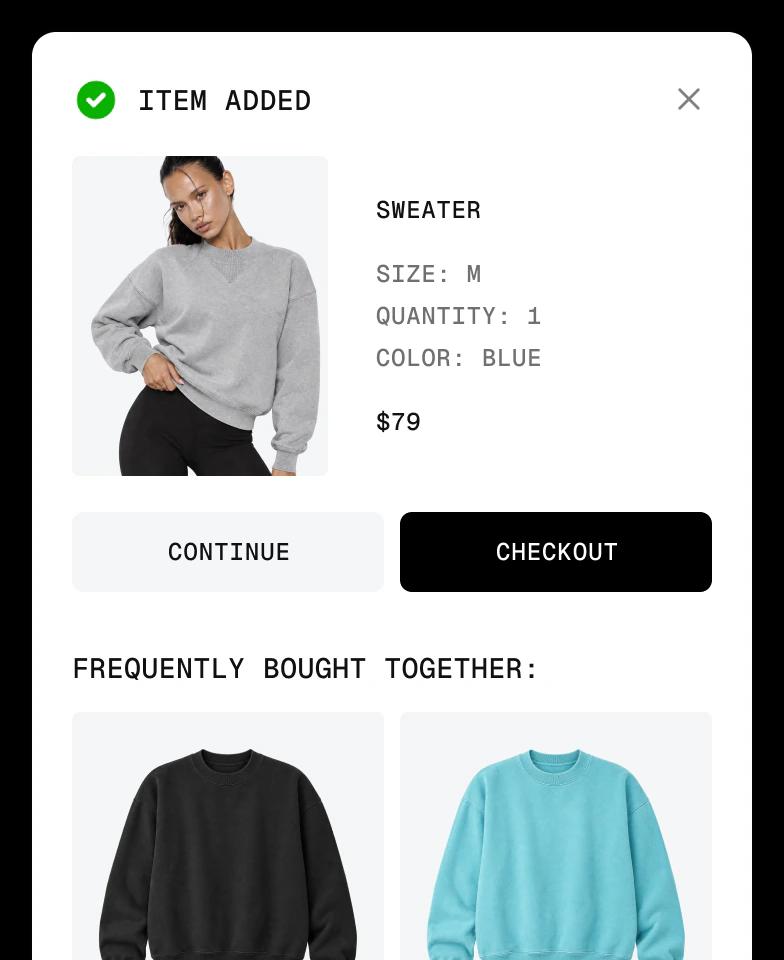
Design a slide-out cart with upsells, rewards, countdown timers and add-ons on a visual canvas, then make it your store's main cart in one click. No code.
Everything your cart needs, built in
A Shopify cart drawer is a slide-out cart that opens when a shopper adds a product, so they can review their order and check out without leaving the page. Most themes include a basic one with a few settings. Instant lets you design your own cart drawer on a visual canvas, with upsells, rewards and add-ons built in, and set it as your store's main cart.
Design it on a visual canvas
Start from a cart drawer template or a blank canvas and control the layout, styling, animations and the empty and filled states. Every element is editable without code.
Upsells and cross-sells
Recommend products that go with what is already in the cart, so shoppers add one more item before they check out.
Multi-tier reward bar
Unlock free shipping, discounts and free gifts as the cart grows. Rewards use the discounts you already set up in Shopify, with thresholds and currency per market.
Cart analytics
Track cart revenue, add-on revenue, conversion rate and average order value, and see where shoppers drop off between opening the cart and completing checkout.




More ways to grow every order
One-tap add-ons
Offer shipping protection, gift wrapping or a free sample right above the checkout button, added to the order with one tap.
Countdown timers
Show how long a limited-time offer lasts inside the cart, so shoppers check out while the deal is on.
A/B test your cart
Test rewards, upsells and layouts against each other natively in Shopify, and keep the cart that earns more per visitor.
Connects to every add to cart button
Turn on cart actions and every add to cart button in your store opens the Instant cart drawer. Works with Dawn, Sense, Horizon, Prestige, Impulse and Impact.


How to add a custom cart drawer to Shopify
From your theme's default cart to a cart drawer built to raise order value, in 3 steps.
Step 1: Install Instant
Add Instant from the Shopify App Store and connect your store. Designing and previewing your cart drawer is free.
Step 2: Design your cart drawer
Start from a template or a blank canvas, then add upsells, a reward bar, add-ons and payment icons, and style them to match your brand.
Step 3: Publish and set as main cart
Publish from the builder and choose Set as main cart. Your drawer opens whenever a shopper adds a product or taps the cart icon.
Everything your store needs, built into Instant
- Page builderBuild any Shopify page with AI, no code.
- Landing pagesCampaign pages that match every ad.
- Product pagesBuy boxes, bundles and subscriptions.
- Collection pagesGrids, filters and featured products.
- Cart drawerUpsells, rewards and a free-shipping bar.
- Product bundlesBundle builders that raise order value.
- Header & footerNavigation, mega menus and footers.
- A/B testingTest pages natively and keep the winner.
- SectionsCustom sections for any theme page.
- Blog pagesBlog posts and listicles that sell.
Shopify cart drawer FAQ
A cart drawer, also called a slide cart or side cart, is a panel that slides in from the side of the screen when a shopper adds a product. It shows the items in the cart, the total and a checkout button, so shoppers can review their order without leaving the page they are on.